Memory System
Clears AI learns from every story it executes. The memory system captures patterns, decisions, and learnings from your codebase and makes them available to future AI executions, so the agent gets smarter with each story it completes.
Three Tiers of Memory
Memory is organized in three tiers, each scoped to a different level of your organization:
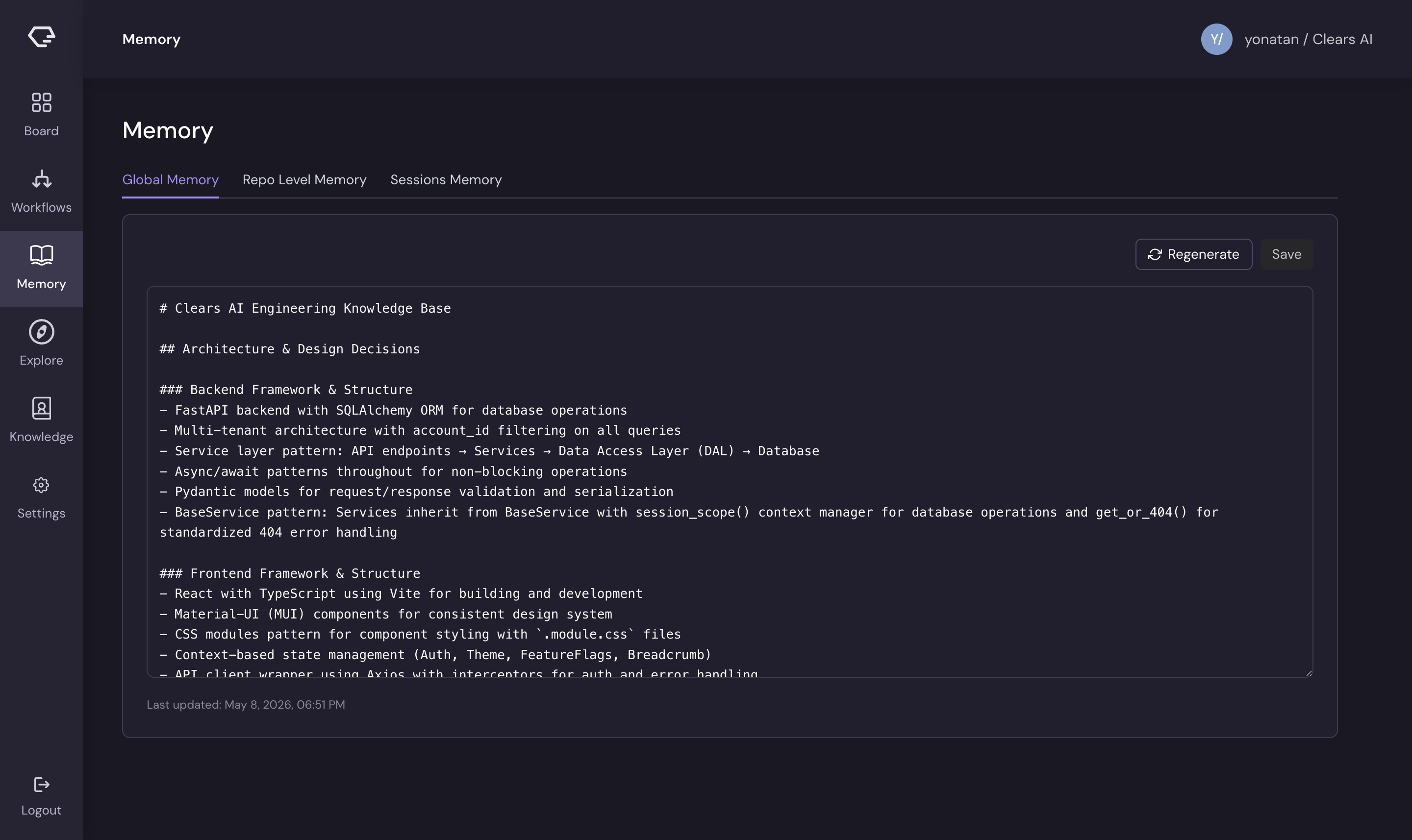
Global Memory
Scope: Your entire Clears AI account - all repositories, all stories.
Global memory captures organization-wide patterns and decisions that apply across your codebase. This includes:
- Architectural conventions and design principles
- Cross-cutting concerns (authentication patterns, error handling, logging)
- API conventions and response formats
- Testing strategies and best practices
- Technology stack decisions and dependencies
When it's used: Global memory is injected into the AI agent's prompt as "organizational knowledge" at the start of a story's first execution, specifically when the story has zero completed subtasks. This gives the agent a broad understanding of your organization's practices before it dives into repository-specific work.
How to manage it:
- View and edit the document directly on the Memory → Global Memory tab
- Click Regenerate to consolidate learnings from recent executions into the document
- Click Save to persist manual edits
Repository Memory
Scope: A single repository - patterns and conventions specific to that codebase.
Repository memory captures learnings tied to a specific repo, including:
- Repository-specific architecture and file organization
- Code patterns and naming conventions unique to the project
- Framework-specific configurations and gotchas
- Known issues, workarounds, and edge cases
- Dependency-specific integration details
When it's used: Repository memory is injected into the AI agent's prompt as "repository knowledge" for every subtask execution that targets that repository. This gives the agent repo-specific context alongside the broader organizational knowledge.
How to manage it:
- Select a repository from the dropdown on the Memory → Repo Level tab
- Only repositories with previous executions appear in the dropdown
- Edit, regenerate, and save the same way as global memory
Session Memory
Scope: Individual story executions - the raw record of what happened during each run.
Session memory is the execution history itself. For every story the AI processes, it records:
- Completed subtasks - for each subtask: files changed, decisions made, patterns discovered, learnings captured, and API contracts identified
- Global learnings - cross-cutting insights from the execution
- Dependencies added - new packages or requirements discovered
- Executed prompts - the actual prompts sent to the AI (when enabled)
How to access it:
- View the execution table on the Memory → Sessions tab
- Each row shows: story key, status, repository, branch, PR link, cost, and creation date
- Expand a row to see the full execution context
- Search by story key or use semantic search to find executions by meaning
How Consolidation Works
Consolidation is the process that transforms raw session data into structured knowledge documents. It bridges the gap between individual execution records and the global/repository memory tiers.
The Process
  Completed Story Executions
          │
          ▼
  ┌──────────────────┐
  │  Consolidation   │  LLM analyzes new learnings
  │  (AI-powered)    │  against existing memory
  └──────────────────┘
          │
          ▼
  ┌──────────────────┐
  │  Memory Document │  Updated with new insights,
  │  (Global or Repo)│  deduplicated and organized
  └──────────────────┘
- Trigger - You click Regenerate on a global or repository memory document
- Fetch - The system retrieves all unprocessed story executions (those not yet consolidated)
- Extract - Session data is formatted: subtask decisions, patterns, learnings, and API contracts are serialized into a readable prompt
- Synthesize - An LLM analyzes the new learnings against the existing memory document
- Merge - New insights are intelligently merged, duplicates are removed, related items are grouped by topic, and the document is reorganized
- Mark processed - Consolidated executions are flagged so they aren't re-processed
The result is a living, deduplicated knowledge base organized by architectural topics, not a chronological log.
What Makes Good Memory
The consolidation process focuses on extractable value:
- Patterns - recurring approaches that should be replicated
- Decisions - architectural choices and their rationale
- Gotchas - edge cases, workarounds, and things that surprised the agent
- API contracts - request/response schemas, authentication requirements
- Conventions - naming, file organization, and code style specific to your codebase
Ephemeral details (specific variable names, one-time fixes) are filtered out to keep memory documents focused and useful.
How Memory Improves Agent Output
When the AI agent starts working on a new story, it receives relevant memory as context in its prompt:
┌─────────────────────────────────────────┐
│              Agent Prompt               │
├─────────────────────────────────────────┤
│  1. Subtask description                 │
│  2. Parent story context                │
│  3. Implementation context              │
│  4. Organizational knowledge  ◀── Global Memory
│  5. Repository knowledge      ◀── Repo Memory
│  6. Visual context (images)             │
│  7. Instructions                        │
└─────────────────────────────────────────┘
This means the agent:
- Follows your conventions - code style, naming patterns, and architectural approaches match what's worked before
- Avoids known pitfalls - gotchas and edge cases from past executions are proactively handled
- Understands your architecture - file organization, component patterns, and data flow are already known
- Reuses API contracts - existing interfaces and response formats are followed rather than rediscovered
- Makes consistent decisions - architectural choices align with previous decisions across the codebase
Example Impact
Without memory, each new story starts from scratch, the agent must rediscover your conventions, make assumptions about patterns, and potentially deviate from established practices.
With memory, the agent begins with knowledge like:
"This repo uses CSS modules for styling, the API client pattern uses
apiUrl()helper with{ data, error }response shape, tests usevi.useFakeTimers()for timer-based interactions, and dark mode is handled via CSS variables under[data-theme='dark']."
This context reduces errors, improves code consistency, and speeds up execution.
Semantic Search
The Sessions tab supports two search modes for finding relevant past executions:
- Text search - keyword-based search by story key, with optional filters for status and date range
- Semantic search - meaning-based search that finds executions by conceptual similarity, not just keyword matching. Returns results ranked by relevance score.
Semantic search requires a one-time backfill to index historical sessions. Click Backfill Sessions on the Sessions tab to start indexing. The process runs through stages (querying → embedding → upserting) and shows progress in real time.
Next Steps
- See the Memory page in action in the Memory feature guide
- Learn how stories produce the execution data that feeds memory in Story Lifecycle
- Start creating stories on the Board